This page documents common Accessibility issues found in Dubbot and links to resources on how to fix them.
Error: Missing aria-labels “menu” and “menuitem”
If you see error in Dubbot on your Accounts\Sites about the Left Navigation menu missing “menu” and “menuitem” you are running on WDS 2 and need to upgrade to WD3. Reach out to the Web Comm Team on how to do that.
Missing Alternative Text
A common error you find in Dubbot is “images must have alternative text” like the following:
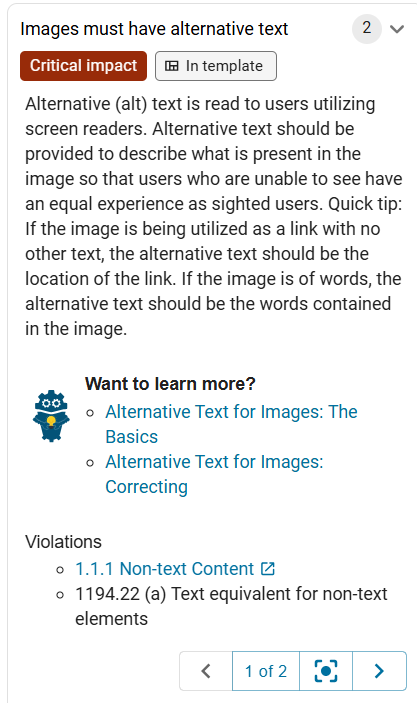
To fix, please see the Images | Digital Accessibility | Washington State University.
Improperly Formed Lists (UL\LI) Errors
If you see an error that talks about “<li> elements must be contained in a <ul> or <ol>” it means the markup for your list is incorrect and will prevent screen reader users from accessing the list. It may also present as UI errors on the screen.
NOTE: This fix could directly involve updating the markup on your page. Be very careful when doing this.
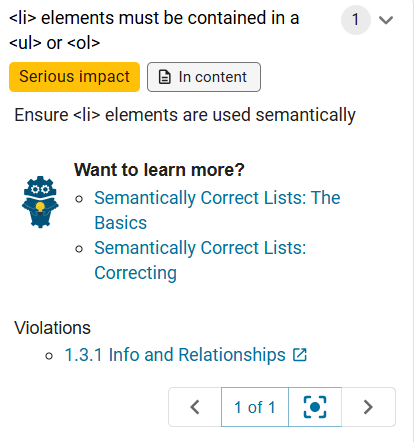
For how to fix these errors see Lists | Digital Accessibility | Washington State University.
This error was specifically about Text on the page being in an <li> element with now surrounding <ul> element. If the element should be a list item, you need to add an opening <ul> and closing </ul> element around it.
Improperly Formed Descriptive (DL) Elements
Similar to List Elements (OL and UL), description Lists Elements (DL) have a specific hierarchy that must be followed. Your DL element must contain both a DT and DD element. Lack of either element shows up in Dubbot as the following error:
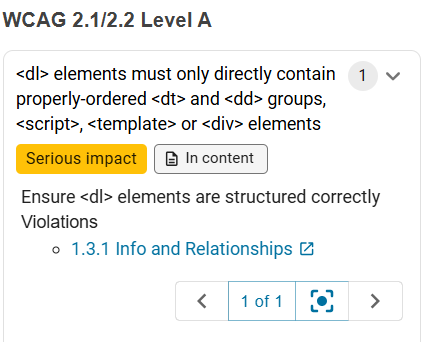
To fix, you need look at the page and see what element is missing. In this case, the DT element was missing. You can add an empty DT element to fix. See more information at <DL Link coming soon>