This page documents rules that you can add to your Accounts (specific Sites in Dubbot) to ignore as they are not valid errors. Some are Accessibility related, others are not.
403 Links
- When you get a 403 when loading a site, it means you do not have access. Some web sites reply to scanning tools like Dubbot with a 403 because the sites want to protect their content from getting scraped. e.g. X\Twitter, Facebook, and Congress.gov all reply with a 403. You can add rules to tell Dubbot to ignore 403s from these sites.
- NOTES:
- Do NOT ignore all 403s as some could be valid errors. e.g. Your site accidentally links to a protected and\or internal site.
- If you see these errors across all of the Accounts\Sites in your Agency, reach out to Dubbot to have them copy them to all of your Sites. That way you do not have to manually add them.
- RegEx example to hide 403 errors from TikTok:
- Go to the Manage Link Checks for your Site\Account.
- Add “https?:\/\/(www\.)?tiktok\.com\/(.*)” do not include the quotes.
- Check after the next scan that these error disappear.
- NOTES:
Red Outlined Text Issue
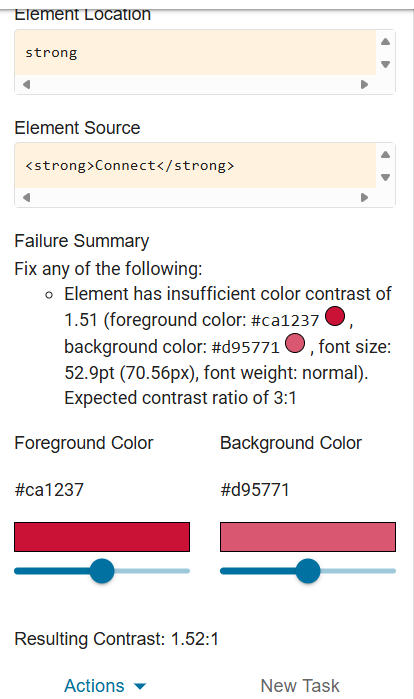
There are more than three pages that use CSS to create text with a WSU Red outline as pictured below:

This text gets flagged by Dubbot as a color contrast error when it is actually not an error. If you see this text flagged by Dubbot AND it shows something like the following, you can safely Ignore this error only on the page that it happens. NOTE: Again, you do not want to Ignore this error on all pages.
Error: Missing aria-labels “menu” and “menuitem”
If you see error in Dubbot on your Accounts\Sites about the Left Navigation menu missing “menu” and “menuitem” you are running on WDS 2 and need to upgrade to WD3. Reach out to the Web Comm Team on how to do that.